
Quick Verdict
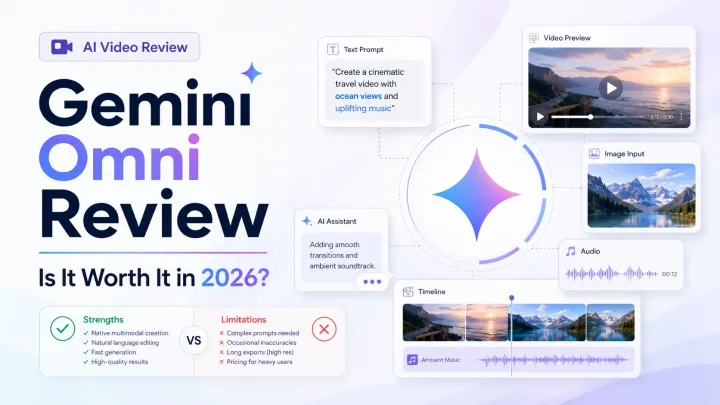
Gemini Omni Flash is one of the most interesting AI video launches of 2026 because it treats video creation as a conversation instead of a one-shot prompt. It can generate short clips with audio from a mix of text, photos, video, and audio, then let you request changes in natural language.
That flexibility makes Gemini Omni especially appealing to YouTubers, social media creators, educators, and marketers producing short-form content. Its launch version is less convincing for long-form work, precise professional editing, or product teams that need a stable developer API and predictable usage costs.
Our recommendation: creators should test Gemini Omni on a real short-form project before paying for a higher Google AI plan. Professional teams should keep established video tools in their workflow until Omni's controls, availability, and production economics become clearer.
Editorial note: This is a launch review based on Gemini Omni Flash's announced capabilities, early availability, and buyer fit. We have not treated Google's product demonstrations as independent quality benchmarks.
What Is Gemini Omni?
Gemini Omni is Google's new family of multimodal creation models, announced at Google I/O on May 19, 2026. The first release, Gemini Omni Flash, focuses on generating and editing short videos with synchronized audio.
Its defining idea is "any input" creation. Instead of starting only with a text prompt, you can use text, photos, video, audio, or a combination of those inputs to guide the result. Google is positioning Omni as a broader creation model, while the initial Flash release is centered on video.
Gemini Omni Flash launched across consumer-facing Google products including the Gemini app, Flow, and YouTube Shorts. Availability and usage limits can vary by product, plan, account, and region.
Who Should Use Gemini Omni?
- YouTubers and short-form creators who want fast concept clips, transitions, or visual experiments
- Social media managers producing multiple creative variations for short campaigns
- Marketers who need quick product visuals without organizing a full shoot
- Educators and presenters who want to animate an idea, image, or demonstration
- Creators already paying for Google AI who can add Omni to an existing workflow
Who Should Wait?
- Long-form filmmakers who need scenes longer than the current short-clip format
- Professional editors who need frame-level control and predictable revisions
- Developers who require documented API access, pricing, and service guarantees
- High-volume teams that need stable generation costs and approval workflows
- Brands with sensitive legal requirements around likeness, copyright, and generated media
Key Features
Multimodal Video Generation
Gemini Omni Flash can use text, photos, existing video, and audio as creative inputs. That opens more practical workflows than basic text-to-video generation. A creator could begin with a product photo, use a reference clip for movement, and describe the intended mood in a prompt.
The value is not simply accepting more file types. Omni is designed to reason across those inputs so the generated clip follows the combined creative direction.
Conversational Editing
Conversational editing is Gemini Omni's clearest differentiator. After generating a clip, you can ask for changes in ordinary language, such as changing the setting, adjusting an object, or revising the camera treatment.
This approach should make iteration more approachable for people who do not use professional video software. It may also reduce the need to rebuild a prompt every time a result is close but not quite usable. The important unanswered question is how reliably identity, motion, and scene details survive several rounds of edits.
Short Clips With Native Audio
Omni Flash generates video and audio together, with clips up to 10 seconds at launch. Native audio can make a result feel more complete than a silent generation, especially for social posts, concept work, and quick story beats.
Ten seconds is useful for individual shots, but it remains a serious constraint for narrative work. Longer content will require multiple generations, careful continuity, and editing in another tool.
Gemini World Knowledge
Google says Omni benefits from Gemini's broader world knowledge. In practical terms, that should help the model interpret people, places, objects, and creative references more accurately than a video model working from a narrower prompt understanding.
That does not guarantee physically perfect or factually accurate footage. AI video can still introduce inconsistent objects, unnatural motion, altered text, and continuity errors, so every output needs review.
Google Product Integration
Omni's biggest strategic advantage may be distribution. Launching inside the Gemini app, Flow, and YouTube Shorts puts the model close to tools creators already use.
For a Shorts creator, fewer export and upload steps can matter more than a small difference in benchmark quality. For professional production teams, integrations with editing software, asset libraries, and approval systems may matter more.
SynthID Provenance
Google uses SynthID to identify AI-generated media across its creation ecosystem. Provenance tools are useful for transparency, but they do not resolve every copyright, likeness, or commercial-use question. Teams should still review Google's current terms and their own publishing requirements.
Realistic Use Cases
Create Short Social Clips
Gemini Omni is a natural fit for visually striking clips that only need to hold attention for a few seconds. Social teams can test several creative directions before choosing one to edit and publish.
Animate Product Images
Marketers can use a still product image as a starting point for a motion concept or campaign mockup. The result may be useful for ideation and organic social content, though high-stakes advertising still needs close review.
Build Storyboards and Previsualization
Filmmakers and creative teams can turn a written scene or reference material into quick visual options. Even when the generated clip is not suitable for final delivery, it can help communicate camera movement, tone, or composition.
Explain Concepts Visually
Educators and presenters can create brief visual demonstrations from text and reference images. This works best when the clip supports an explanation rather than serving as evidence of a factual event.
Gemini Omni Pricing and Access
Gemini Omni Flash is available through selected Google products and paid Google AI plans, but access rules and generation limits are likely to change as Google expands the rollout. Google also uses plan-dependent usage limits, so the real cost depends on how often you generate, how many attempts a usable clip takes, and whether edits consume additional allowance.
Before upgrading, check the current limits shown in your Google account and run a small real-world test. AI video pricing can look affordable until a project requires many retries.
For developers, consumer subscription access is not a substitute for a production API. Confirm current Gemini API or Vertex AI availability, pricing, quotas, and commercial terms before designing a product around Omni.
Pros and Cons
Pros
- Accepts a useful mix of text, photo, video, and audio inputs
- Makes video editing approachable through natural-language requests
- Generates synchronized audio with video
- Fits naturally into Google's creator ecosystem
- Strong potential for short-form ideation and rapid variations
- Benefits from Gemini's broad understanding of prompts and references
Cons
- Clips are limited to 10 seconds at launch
- Quality and continuity can still vary between generations
- Usage limits and effective cost may be hard to predict
- Professional editing controls remain more limited than mature video software
- API availability and production economics need confirmation
- Generated media still raises copyright, likeness, and brand-safety questions
Gemini Omni vs Alternatives
| Tool | Best For | Main Advantage Over Omni | Main Tradeoff |
|---|---|---|---|
| Gemini Omni Flash | Conversational short-form creation | Multimodal inputs and natural-language revisions | New product with short clips and evolving limits |
| Runway | Creative production and generative filmmaking | More mature creative controls and production workflow | Can require more learning and budget |
| HeyGen | Avatar-led marketing and translation | Purpose-built presenters, avatars, and localization | Less suited to open-ended cinematic generation |
| Synthesia | Training and corporate video | Consistent enterprise avatar workflow | Less flexible for imaginative visual scenes |
Choose Gemini Omni If
You want to create short clips from mixed media, prefer a conversational workflow, and already use Google's creator products.
Choose Runway If
You need a more established generative video workspace with deeper creative controls and a workflow aimed at professional creators.
Choose HeyGen or Synthesia If
Your main goal is a reliable presenter-led video for marketing, sales, onboarding, or training. Their structured avatar workflows are usually more predictable than open-ended generation.
Is Gemini Omni Worth Paying For?
For individual creators, Gemini Omni can justify a paid Google AI plan when it complements other Gemini features you already use. It is harder to justify a subscription solely for Omni until you know how many usable clips your allowance produces.
For small marketing teams, it is worth testing for social concepts, storyboards, and quick variations. Keep a conventional editing tool nearby for assembly, captions, timing, brand review, and final delivery.
For developers and high-volume production teams, the answer is not yet clear. Those buyers need dependable API access, transparent unit economics, and operational controls, not only impressive demos.
Final Recommendation
Gemini Omni Flash makes AI video feel more approachable by combining mixed-media inputs, native audio, and conversational editing in one workflow. That is a meaningful step forward for creators who want to shape a clip without learning a complex editing interface.
Its launch limitations matter just as much as its strengths. Ten-second clips, variable generations, evolving usage limits, and unclear production economics make Omni better for experimentation and short-form creation than for replacing a professional video pipeline.
Start with one real project: create a short clip, request several edits, and track how long it takes to reach a publishable result. If that process is faster than your current workflow, Gemini Omni is worth keeping. If you need precision, length, or predictable scale, Runway or a purpose-built avatar platform remains the safer choice.
Frequently Asked Questions
What is Gemini Omni?
Gemini Omni is Google's multimodal creation model family. Its first release, Gemini Omni Flash, generates and edits short videos with audio using text, photos, videos, audio, or combinations of those inputs.
How long are Gemini Omni Flash videos?
Gemini Omni Flash generates clips up to 10 seconds long at launch. Longer projects require multiple clips and editing in a separate workflow.
Can Gemini Omni edit existing videos?
Yes. Existing video can be used as an input, and Omni supports conversational requests for changes. Results still need review because complex edits may affect continuity or details.
Does Gemini Omni generate audio?
Yes. Omni Flash can generate video and synchronized audio together.
Is Gemini Omni free?
Access depends on the Google product, plan, account, and region. Check the current limits in Gemini, Flow, or YouTube before assuming a specific number of free generations.
Does Gemini Omni have an API?
Developers should check the current Gemini API and Vertex AI documentation before planning an integration. Product availability in the Gemini app does not guarantee the same model is ready for production API use.
Is Gemini Omni better than Runway?
Gemini Omni is more compelling for conversational editing and Google ecosystem integration. Runway is the stronger choice when you need a mature creative workspace and deeper production controls.
Can businesses use Gemini Omni videos commercially?
Commercial use depends on Google's current terms and the content being generated. Businesses should review rights, likeness permissions, brand rules, and disclosure requirements before publishing.
Sources and Update Notes
This review reflects launch information available in June 2026. Product access, limits, and pricing can change quickly. Check Google Gemini for current availability and The Verge's Gemini Omni launch report for reported launch details.
Tools Mentioned
Google Gemini
Google AI assistant for search, productivity, research, and multimodal work
This visit is routed through AIToolNest so we can keep tool links accurate and measure interest.
Runway
AI video generation and editing suite for filmmakers and creators
This visit is routed through AIToolNest so we can keep tool links accurate and measure interest.
Synthesia
AI avatar video platform for training, explainer, and corporate content
This visit is routed through AIToolNest so we can keep tool links accurate and measure interest.
HeyGen
AI avatar and video translation platform for marketing and sales video
This visit is routed through AIToolNest so we can keep tool links accurate and measure interest.
Related Posts
Keep reading

OpenAI ChatGPT Review 2026: Is It Still the Best AI Tool?
ChatGPT in 2026 is a different product than it was a year ago, with GPT-5.5 models, agentic features, and seven pricing tiers. We break down what's new, what it costs, where it wins, where it falls behind Claude and Gemini, and whether it's still the AI tool to beat.
Read article
Jasper AI Review: Is It Worth It for Marketing Teams?
Quick Verdict Jasper AI is worth shortlisting when your team publishes a steady stream of marketing assets and needs consistent brand voice controls. It is less compelling if you only need occasional copy or want the lowest cost AI writing option. What It Does Well Turns briefs i...
Read article